Blogging isn’t about ‘finding your voice.’
It’s about finding your bank account - and filling it.
The blogging landscape has evolved dramatically since its inception, yet it remains one of the most accessible ways to build an online presence and generate income in 2025.
Despite predictions of blogging's demise, the industry continues to thrive with over 600 million blogs worldwide and top bloggers earning six and seven-figure incomes annually.
If you're here to learn how to start a blog for free and make money in 2025, then this comprehensive guide will walk you through the entire process of starting a blog for free and transforming it into a profitable online business.
Whether you're looking to share your expertise, build a personal brand, or create a sustainable income stream, this updated guide for 2025 provides all the tools, strategies and insights you need to succeed in today's competitive digital environment.
By the end of this guide, you'll understand how to:
- Choose a profitable niche that aligns with your interests and market demand.
- Set up your blog with the right platform and technical foundation.
- Create compelling content that attracts and retains readers.
- Build a loyal audience through SEO and social media.
- Implement multiple monetization strategies to generate income.
- Scale your blog into a sustainable business.
Let's dive into the exciting world of blogging and discover how you can turn your passion into profit in 2025.
📌 Save This Guide & Unlock Your Free Bonus
Bookmark this page now - you’ll want to revisit these strategies as you build your blog.
For even faster results, get our free ‘2025 Blog Launch Checklist’ (no fluff, just the exact steps we used to hit $17k/month).
👇 Where should I send it?
Your email will neither be sold nor shared. We hate SPAM!
Disclaimer: Please note that this post includes affiliate links which provide a commission to me at no cost to you. However, the links are for the best software and tools you need to start a successful blog. For more information, you can read my affiliate disclosure in our Privacy policy
Can I Learn How to Start a Blog for Free and Make Money in 2025?
With the rise of social media, video content and AI-generated articles, you might wonder if blogging is still a viable path to online income.
The short answer is a resounding yes - but the landscape has changed significantly.
The Current State of Blogging in 2025
Blogging has matured from simple online journals to sophisticated content hubs that serve as the foundation for multi-channel businesses.
While competition has increased, so have the opportunities for monetization and audience building.
Recent industry data shows that:
- 77% of internet users read blogs regularly.
- Businesses with blogs generate 67% more leads than those without.
- Content marketing (including blogging) costs 62% less than traditional marketing while generating three times as many leads.
- Niche blogs with dedicated audiences can monetize more effectively than general interest publications.
The key difference in 2025's blogging landscape is the emphasis on quality over quantity, multi-format content integration and strategic monetization across multiple channels.
Realistic Income Expectations and Timeline
Understanding realistic expectations is crucial for new bloggers.
While stories of overnight success exist, they're the exception rather than the rule.
Most successful bloggers follow a timeline similar to this:
- Months 1-3: Setting up the blog, creating initial content, minimal or no income.
- Months 4-6: Building an audience, implementing initial monetization, $0-$100/month.
- Months 7-12: Growing traffic, expanding content, refining monetization, $100-$500/month.
- Year 2: Established audience, multiple income streams, $500-$2,000/month.
- Years 3+: Scaling content and monetization, $2,000-$10,000+/month.
According to a 2024 survey of professional bloggers, the average time to reach $1,000 per month in blog income was 14 months.
However, this timeline can vary significantly based on niche, content quality, promotion strategies and monetization methods.
Sadly, this is where roughly 68% of new bloggers give up. They come eager to learn 'how to start a blog for free and make money' - only to quit when their progress doesn’t match unrealistic timelines.
Success Stories from Recent Bloggers
While established blogs dominate many niches, new success stories emerge regularly:
- Emma Chen, Sustainable Living Blog
Started in 2023, Emma's blog reached 100,000 monthly visitors within 18 months by focusing on practical sustainability tips for everyday life.
She now earns over $7,000 monthly through a combination of affiliate marketing, digital products and sponsored content.
- Marcus Johnson, Home Office Setup
Launching his blog during the remote work boom, Marcus identified a specific niche helping people optimize their home office setups.
Starting in 2022, he now generates $12,000 monthly primarily through affiliate commissions from ergonomic furniture and tech accessories.
- Priya Sharma, Simplified Cooking
Priya started her cooking blog in 2023 focusing exclusively on 5-ingredient recipes.
By solving a specific problem (complex recipes with too many ingredients), she built an audience of busy professionals and now earns $5,000 monthly through cookbook sales, meal planning subscriptions and cooking tool affiliates.
These examples share common elements: they identified specific audience needs, created valuable content consistently, and diversified their income streams.
Challenges and Opportunities in Today's Blogging Landscape
- Increased competition across most niches.
- Higher content quality expectations from readers.
- Algorithm changes affecting search visibility.
- AI-generated content flooding certain markets.
- Shorter attention spans requiring more engaging content.
- More monetization options than ever before.
- Better tools for content creation and audience building.
- Increased trust in authentic, human-created content.
- Growing demand for expert curation in the age of information overload.
- Ability to repurpose blog content across multiple platforms.
Why Blogging Remains Relevant Despite Social Media and AI Content
Blogging offers distinct advantages that social media and AI-generated content cannot replicate:
- Ownership and control: Your blog's an asset you own, unlike social media platforms where you're at the mercy of changing algorithms and policies.
- Depth and authority: Blogs allow for comprehensive exploration of topics, establishing you as an authority in ways that short-form social content cannot.
- SEO benefits: Well-optimized blog content continues to drive organic traffic for years, unlike social media posts that quickly disappear from feeds.
- Monetization flexibility: Blogs offer more diverse and sustainable monetization options compared to social platforms.
- Human expertise and perspective: As AI-generated content becomes ubiquitous, authentic human expertise, experiences, and perspectives become more valuable.
The most successful bloggers in 2025 don't see social media and AI as threats but as complementary tools - using social platforms to drive traffic to their blogs and AI to streamline certain aspects of content creation while maintaining their unique human voice.
Finding Your Profitable Niche in 2025
Selecting the right niche's perhaps the most crucial decision you'll make as a blogger.
In 2025's saturated market, the key's finding the sweet spot between your interests, audience needs and profit potential.
How to Identify Profitable Niches in 2025's Saturated Market
The most profitable niches balance personal interest, expertise, audience demand and monetization potential.
Here's a systematic approach to finding yours:
- Start with your interests and expertise: List topics you're passionate about or have specialized knowledge in. Sustainable interest is essential for long-term blogging success.
- Evaluate commercial potential: For each potential topic, ask:
- Are people actively searching for information on this topic?
- Do products or services related to this niche exist that you could promote?
- Are there problems in this space that you could solve with digital or physical products?
- Analyze competition: Some competition's good, it validates market demand. However, you need to find angles where you can differentiate yourself.
- Identify sub-niches: Breaking down broader topics into more specific niches often reveals profitable opportunities. For example, instead of "fitness," consider "strength training for busy professionals over 40.
- Validate with research: Use the tools mentioned below to confirm search volume, competition levels and monetization potential.
Niche Research Tools and Techniques
These tools will help you evaluate potential niches:
Evaluating Competition and Market Demand
Not all competition's equal. Here's how to evaluate the competitive landscape:
- Search for your main keywords: Analyze the top 10 results:
- Who ranks at the top? Individual bloggers or major publications?
- How comprehensive is their content?
- What's their content quality and frequency?
- How established are they (domain age, backlink profile)?
- Look for gaps: What's missing from existing content? What unique angle could you provide?
- Check social engagement: Are top articles getting shares and comments? Low engagement might indicate low interest or poor content quality.
- Analyze monetization methods: How are successful blogs in this niche making money? This provides clues about commercial potential
The ideal scenario's finding a niche with decent search volume, engaged audience, clear monetization paths, but with content gaps you can fill with your unique perspective or expertise.
If there ever was a reason to learn how to start a blog for free and make money in 2025 and beyond - this would be it!
Balancing Passion with Profitability
While profit potential's important, passion for your topic will sustain you through the challenging early months.
Consider these factors when balancing passion and profit:
- Sustainability: Can you see yourself writing about this topic weekly for the next 2-3 years?
- Expertise development: Are you willing to become an expert if you're not already? The best blogs demonstrate clear expertise.
- Audience connection: Do you genuinely care about helping the audience in this niche?
- Monetization comfort: Are you comfortable with the primary monetization methods in this niche?
The sweet spot is where your interests overlap with audience needs and commercial opportunities.
Niche Trends and Opportunities Specific to 2025
Some niches showing strong growth potential in 2025 include:
- AI tools and implementation for specific industries: Helping non-technical professionals leverage AI in their work.
- Sustainable living with practical applications: Beyond theory to actionable sustainability
- Mental health and wellness for specific demographics: Tailored approaches for different life stages
- Financial independence in changing economic landscapes: Adapting to new economic realities
- Remote work optimization and management: Tools, strategies and productivity systems
- Digital privacy and security for everyday users: Making complex security accessible.
- Specialized fitness for underserved demographics: Fitness approaches for specific needs or conditions.
- Tech simplification for non-technical users: Making technology accessible to late adopters.
- Creative side hustles and alternative income: Beyond traditional employment models.
- Ethical consumption and conscious purchasing: Helping consumers make values-aligned choices.
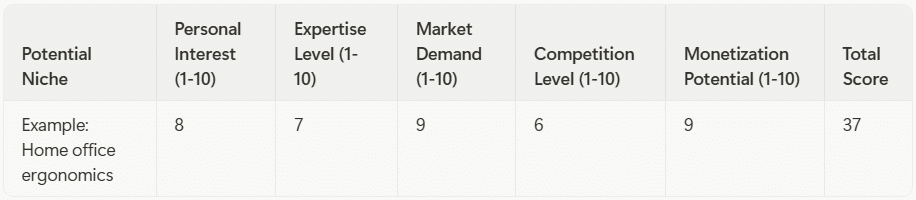
Niche Selection Framework: Worksheet
To help you select your niche, consider this evaluation framework:
For each potential niche, score these five factors from 1-10, then calculate the total.
Niches scoring 35+ typically offer the best balance of passion and profit potential.
Remember that the most successful blogs often combine two interests or perspectives to create a unique angle. For example, "finance for creative professionals" or "fitness for busy parents" creates a more defined audience than broader topics.
Setting Up Your Blog (Technical Foundation)
With your niche selected, it's time to build the technical foundation of your blog.
In 2025, the platform you choose and how you set it up can significantly impact your long-term success.
How to start a blog for free and make money boils down to leverage - not spending what you don't have before you start seeing any results.
Choosing the Right Blogging Platform in 2025
Your blogging platform's the foundation of your online presence.
Here's a comparison of the top options in 2025:
WordPress.org (Self-hosted)
- Pros: Maximum flexibility and control, unlimited monetization options, extensive plugin ecosystem, complete ownership
- Cons: Steeper learning curve, responsible for maintenance and security, not entirely free (requires hosting)
- Best for: Serious bloggers planning to monetize and scale
- Cost: $3-15/month for hosting + optional premium themes/plugins
- Pros: Easier setup than self-hosted WordPress, handles technical maintenance
- Cons: Limited customization and monetization on free plans, higher costs for premium features
- Best for: Beginners wanting simplicity with room to grow
- Cost: Free plan available; Business plan ($25/month) needed for plugins and monetization
- Pros: Conversion-focused drag n drop templates, integrated suite of marketing tools, excellent for monetization
- Cons: Requires WordPress.org, moderately steep learning curve, additional cost
- Best for: Bloggers focused on conversions and monetization
- Cost: $99/year or $299 lifetime (plus WordPress hosting costs)
- Pros: User-friendly drag-and-drop interface, all-in-one solution, good templates
- Cons: Less flexible than WordPress, limited SEO capabilities on basic plans
- Best for: Visual-focused blogs where design is paramount
- Cost: Free plan available; Premium plans $16-45/month for serious features
- Pros: Beautiful templates, all-in-one solution, good for visual content
- Cons: Less flexible than WordPress, fewer third-party integrations
- Best for: Photographers, artists and design-focused blogs
- Cost: $16-49/month, no truly free option
- Pros: Clean interface focused on writing, built-in membership/subscription features
- Cons: Less flexible than WordPress, fewer themes and plugins
- Best for: Minimalist blogs focused on written content and subscriptions
- Cost: $9-199/month for hosted; free if self-hosted (technical setup required)
- Pros: Instant audience, zero technical setup, Partner Program for monetization
- Cons: Limited control, cannot fully customize, don't truly "own" your platform
- Best for: Beginners testing the waters or as a supplementary platform
- Cost: Free to publish; $5/month membership to read unlimited articles
Recommendation for most bloggers in 2025: Self-hosted WordPress with Thrivethemes for conversion optimization offers the best balance of control, flexibility and monetization potential.
While not completely free to start, this combination provides the strongest foundation for building a profitable blog.
Domain Name Selection Strategies
Your domain name is your blog's address and a key part of your brand.
Follow these strategies to select a strong domain:
- Keep it simple and memorable: Shorter domains are easier to remember and type
- Use .com when possible: Still the most recognized and trusted extension
- Avoid hyphens and numbers: These can confuse visitors and seem less professional
- Consider keywords: Including a relevant keyword can help with SEO, but don't force it
- Make it brandable: Choose something distinctive that can grow with your blog
- Check social media availability: Ensure the same name is available on key platforms
- Verify trademark issues: Ensure you're not infringing on existing trademarks
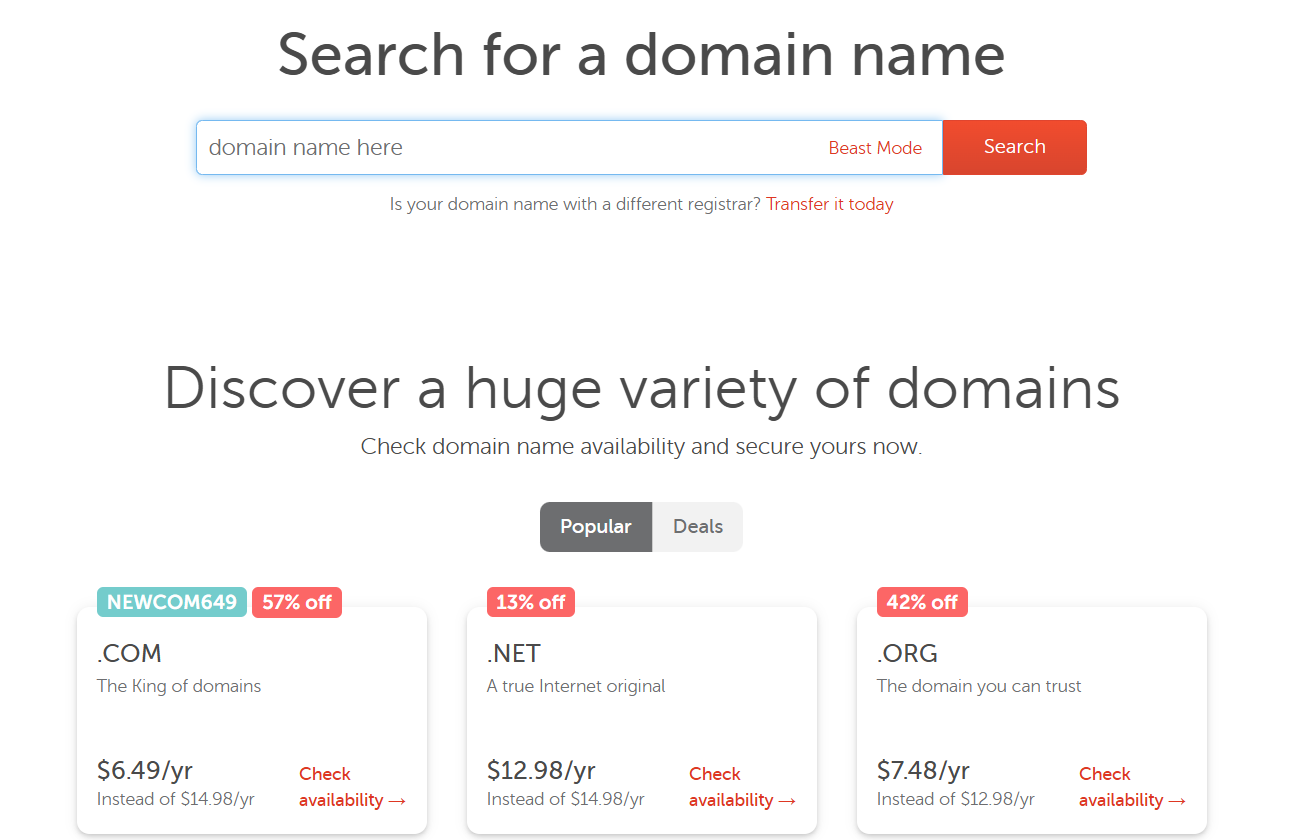
Domain registration services
Budget $10-15 annually for your domain name.
While free subdomains exist (like yoursite.wordpress.com), a custom domain builds credibility and is essential for serious monetization.
Hosting Options and Recommendations
If you choose self-hosted WordPress (recommended for monetization), you'll need a hosting provider.
Here are the top options for 2025:
Shared Hosting (Budget Option)
Managed WordPress Hosting (Performance Option)
- WP Engine: Premium WordPress-specific hosting with excellent support, $25 - 95/month
- Kinsta: High-performance hosting with great dashboard, $35 - 115/month
- Flywheel: Designer-friendly interface, great for creatives, $15 - 75/month
Cloud Hosting (Scalability Option)
- Cloudways: Flexible cloud hosting on various infrastructures, $10-80/month
- DigitalOcean: More technical but very powerful, $5-40/month
- Vultr: High-performance cloud at reasonable prices, $5-60/month
For beginners serious about how to start a blog for free and make money, Namecheap offers the best balance of affordability, performance, and support.
As your traffic grows, consider upgrading to managed WordPress hosting for better performance and support.
Step-by-Step Setup Instructions with Screenshots
Let's walk through setting up a self-hosted WordPress blog with NameCheap and Thrivethemes:
Step 1: Register your domain and set up hosting
- Go to SiteGround.com and select "WordPress Hosting"
- Choose the "StartUp" plan for beginners or "GrowBig" for more features
- Register a new domain or use one you already own
- Complete the account information and payment details
- Once payment is processed, you'll receive an email with login details
Step 2: Install WordPress
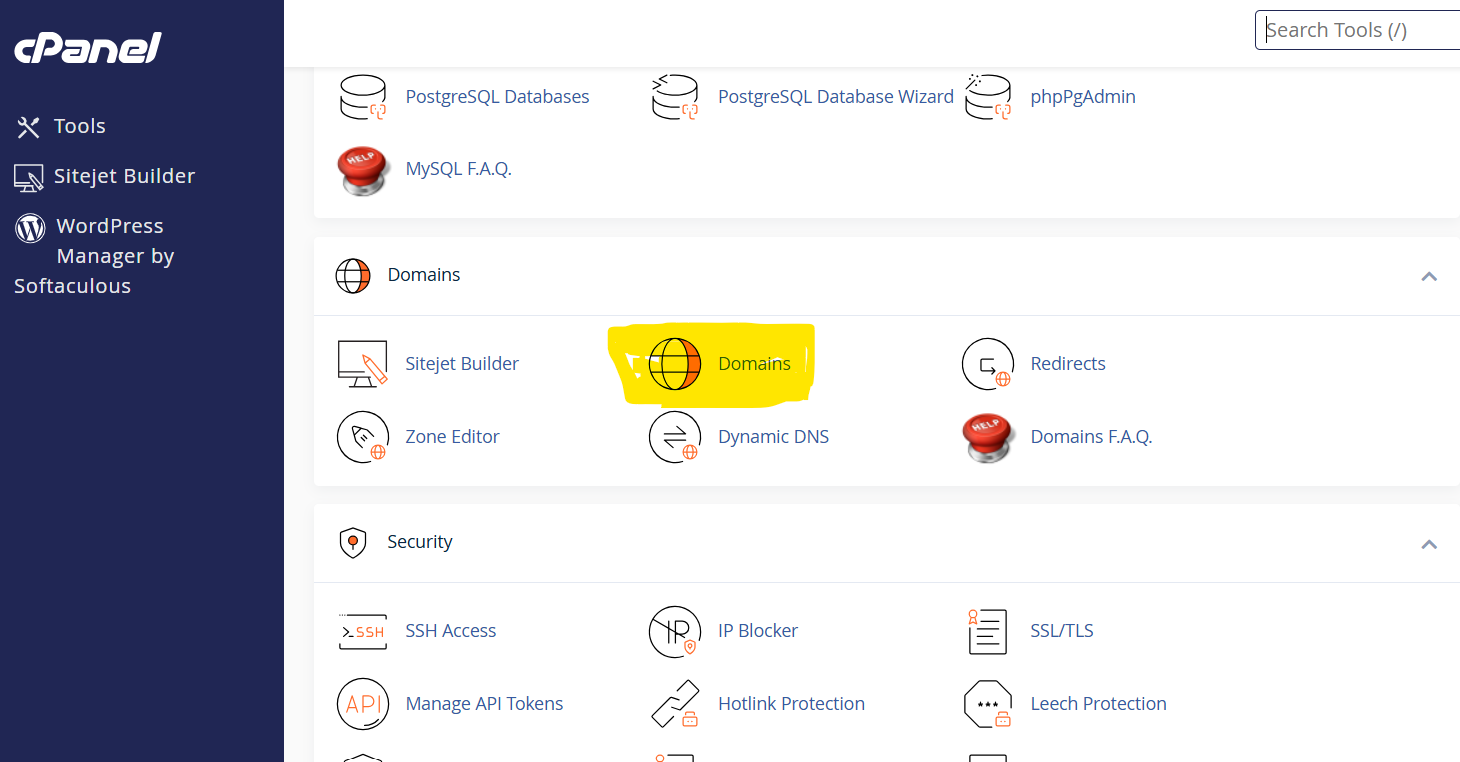
- Log in to your Namecheap Cpanel account
- Navigate to the "Websites" section
- Click "New Website" and select "Start New Website"
- Choose WordPress and create admin credentials
- Wait for installation to complete (usually just a few minutes)
Step 3: Log in to your WordPress dashboard
- Access your WordPress admin area at yourdomain.com/wp-admin
- Enter the username and password you created during installation
- You'll see the WordPress dashboard, your control center for your blog
- Get your Thrivethemes license here
- Download the Thrive Theme Builder plugin
- In your WordPress dashboard, go to Plugins > Add New > Upload Plugin
- Upload the Thrive Theme Builder zip file and activate
- Follow the setup wizard to install and customize your theme
- Go to Appearance > Themes > Add New
- Browse the free themes or search for specific features
- Preview themes that interest you
- Click "Install" and then "Activate" on your chosen theme
Step 5: Install essential plugins
Navigate to Plugins > Add New and install these essentials:
Step 6: Configure basic settings
- Go to Settings > General to set your site title and tagline
- Go to Settings > Permalinks and select "Post name" structure for SEO-friendly URLs
- Set up your user profile under Users > Your Profile
- Create essential pages: About, Contact, Privacy Policy, Terms of Service
Step 7: Set up your blog structure
- Create categories for your main content topics
- Set up your main navigation menu under Appearance > Menus
- Configure widgets in your sidebar under Appearance > Widgets
Essential Plugins and Tools for 2025
Beyond the basics mentioned above, consider these specialized tools for a professional blog in 2025:
Content Creation and Management
- Thrive Architect: Visual page builder for creating beautiful posts and pages
- Grammarly: Grammar and spelling checker
- Yoast SEO Premium or Rank Math Pro: Advanced SEO features
- Editorial Calendar: Plan and schedule content
Email Marketing Integration
- ConvertKit, Mailchimp, or Flodesk: Email marketing platforms
- Thrive Leads or OptinMonster: Lead generation tools
- Easy Affiliate Links: Manage and track affiliate links
- Advanced Ads or Ad Inserter: Ad management
- WooCommerce: Sell products or digital downloads
- MemberPress or Paid Memberships Pro: Membership and subscription functionality
Analytics and Optimization
- MonsterInsights: Google Analytics integration
- Hotjar: Heatmaps and user recordings
- Thrive Optimize: A/B testing
- Social Snap or Grow Social: Social sharing buttons
- Smash Balloon: Social media feeds on your blog
- Revive Old Posts: Automatically share old content to social media
- WP Rocket: Premium WordPress plugin that significantly improves website speed and performance through caching.
- ShortPixel or Imagify: Image optimization
- Sucuri: Advanced security
Mobile Optimization Requirements
In 2025, mobile optimization isn't optional - it's essential.
Google primarily uses mobile-first indexing, meaning it predominantly uses the mobile version of your site for ranking and indexing.
Key mobile optimization requirements:
- Responsive design: Your theme must adapt to all screen sizes
- Fast loading times: Aim for under 2 seconds on mobile devices
- Easy navigation: Large enough tap targets and intuitive menus
- Readable text without zooming: Minimum 16px font size recommended
- No intrusive interstitials: Avoid pop-ups that cover the main content on mobile
- Compressed images: Optimize images for faster loading
- Mobile-friendly forms: Forms should be easy to complete on small screens
Test your site's mobile optimization using:
Security Considerations for Modern Blogs
Blog security has become increasingly important as cyber threats evolve, especially for those learning how to start a blog for free and make money.
Implement these security measures for your own peace of mind:
- Strong passwords: Use unique, complex passwords for your hosting, WordPress and email accounts
- Two-factor authentication: Enable 2FA wherever available
- Regular updates: Keep WordPress, themes and plugins updated
- Security plugin: Install Wordfence, Sucuri or iThemes Security
- Regular backups: Use UpdraftPlus or a hosting-provided backup solution
- SSL certificate: Ensure your site uses HTTPS (most hosts provide free SSL)
- Limit login attempts: Prevent brute force attacks
- File permissions: Set proper file permissions (your host can advise)
- Malware scanning: Regular scans for malicious code
- User roles: Only give necessary permissions to contributors
By following these technical setup guidelines, you'll build a solid foundation for your blog that supports growth, monetization and security as you scale.
Designing Your Blog for Success
Your blog's design significantly impacts user experience, credibility, and conversion rates.
In 2025, blog design goes beyond aesthetics to focus on user experience, conversion optimization and technical performance.
User Experience Principles for 2025
Modern blog design prioritizes these user experience principles:
- Clarity over complexity: Clean designs with clear visual hierarchy outperform cluttered, complex layouts.
- Content-first approach: Design should showcase your content, not compete with it.
- Intuitive navigation: Users should instantly understand how to find what they need
- Reduced cognitive load: Minimize distractions and unnecessary choices
- Accessibility: Design for users of all abilities (color contrast, text size, screen reader compatibility)
- Consistency: Maintain consistent design elements throughout your blog
- Purposeful white space: Strategic use of white space improves readability and focus
- Feedback mechanisms: Visual cues that confirm user actions (hover states, form validation)
- Performance as UX: Fast-loading pages are fundamental to good user experience.
- Dark mode options: Offering light/dark preferences improves accessibility.
Modern Blog Design Elements That Convert
These design elements have proven to increase engagement and conversion rates:
- Strategic color psychology: Primary colors that evoke the right emotions for your niche
- Prominent call-to-action buttons: Clear, contrasting buttons for key conversion actions
- Social proof elements: Testimonials, subscriber counts or featured-in logos.
- Scannable content formatting: Strategic use of headers, bullet points and short paragraphs.
- Custom graphics and illustrations: Unique visuals that reinforce your brand.
- Micro-interactions: Subtle animations that provide feedback and delight
- Featured content sections: Highlighting your best or most popular content
- Email capture forms: Strategically placed, benefit-focused opt-in forms.
- Author information: Prominent author bio to build credibility and connection
- Related content suggestions: Keeping readers engaged with relevant recommendations.
Responsive Design Requirements
Responsive design ensures your blog looks and functions well on all devices.
Key requirements include:
- Fluid grid layouts: Content that adjusts proportionally to screen size
- Flexible images: Images that scale within their containing elements.
- Media queries: CSS rules that apply different styles based on device characteristics.
- Touch-friendly elements: Buttons and links large enough for touch interaction (minimum 44×44 pixels).
- Simplified navigation on mobile: Often using hamburger menus or other space-saving techniques.
- Readable typography without zooming: Minimum 16px font size for body text.
- Optimized content hierarchy: Prioritizing essential content on smaller screens.
- Form optimization: Simplified forms with appropriate input types for mobile
- Table handling: Strategy for making data tables accessible on small screens
- Testing across devices: Regular testing on various screen sizes and devices
Essential Pages Every Blog Needs
Beyond your blog posts, these pages are essential for a professional blog:
- About Page - Your story, mission and credentials.
- Include your photo and personal story
- Explain who your blog helps and how
- Highlight your expertise and credentials
- Connect emotionally with your ideal reader
- Contact Page: How readers can reach you
- Simple contact form
- Email address (consider using a form or obfuscated address to prevent spam)
- Response time expectations
- Alternative contact methods if applicable
- Privacy Policy: Legal requirement for most blogs.
- Cookie usage
- Data collection practices
- Email marketing policies
- Third-party service usage
- Terms and Conditions: Protects your content and clarifies relationship with users
- Copyright information
- Acceptable use policies
- Disclaimer of liability
- Disclosure of affiliate relationships
- Start Here Page: Guides new visitors through your content
- Overview of what your blog offers
- Links to cornerstone content
- Clear next steps for new readers
- Quick wins they can implement immediately
- Resources/Tools Page: Products and services you recommend
- Categorized recommendations
- Brief descriptions of why you recommend each item
- Disclosure of affiliate relationships
- Personal experience with the products when applicable
- Archives/Categories: Organized access to your content
- Logical category structure
- Search functionality
- Filter options
- Featured posts within each category
Navigation and Site Structure Best Practices
Effective navigation helps readers find what they need and discover more of your content:
- Limit main navigation item: 5-7 items maximum in primary navigation
- Use descriptive labels: Clear, concise menu labels that instantly communicate content
- Implement logical hierarchy: Organize content in intuitive categories and subcategories
- Include search functionality: Prominent search bar for direct content access
- Consider mega menus for content-rich blogs: Organized visual menus for blogs with extensive content.
- Use breadcrumbs for deep content: Help users understand their location within your site
- Create content hubs: Centralized pages that link to related content on a specific topic
- Implement sidebar navigation: Category lists, popular posts, or related content
- Use footer navigation for secondary pages: Privacy policy, terms, contact etc.
- Consider sticky navigation: Navigation that remains visible as users scroll
Speed Optimization Techniques
Page speed directly impacts user experience, SEO and conversions.
Implement these optimization techniques:
- Choose a fast-hosting provider: Quality hosting is the foundation of site speed
- Use a lightweight, optimized theme: Avoid bloated themes with unnecessary features
- Implement caching: Browser caching and server-side caching
- Compress images without quality loss
- Use modern formats like WebP
- Implement lazy loading
- Specify image dimensions
- Combine CSS and JavaScript files
- Use CSS for simple images instead of image files
- Limit the number of external resources
- Enable GZIP compression: Compress files before sending them to browsers
- Minify code: Remove unnecessary characters from HTML, CSS, and JavaScript
- Use a Content Delivery Network (CDN): Distribute content across multiple servers worldwide
- Optimize CSS delivery: Inline critical CSS and defer non-critical CSS
- Reduce plugin bloat: Only use necessary plugins and remove unused ones
Accessibility Considerations
Making your blog accessible ensures all users can access your content, regardless of disabilities or limitations:
- Semantic HTML: Use proper HTML elements for their intended purpose
- Sufficient color contrast: Ensure text is readable against its background
- Text alternatives for images: Descriptive alt text for all informational images
- Keyboard navigation: Ensure all functionality is available without a mouse
- Descriptive link text: Avoid "click here" in favor of descriptive link text
- Proper heading structure: Use H1 - H6 tags in logical, hierarchical order
- ARIA landmarks: Help screen readers identify page regions
- Accessible forms: Labels, error messages and keyboard accessibility
- Captions and transcripts: For video and audio content
- Resizable text: Ensure text can be resized up to 200% without breaking layout
Whether you're a seasoned blogger, or someone in the process of learning how to start a blog for free and make money, implementing these design principles will create a blog that not only looks professional but also delivers an exceptional user experience that converts visitors into subscribers and customers.
Content Strategy for 2025
Creating high-quality content consistently's the foundation of blogging success.
In 2025 and beyond, content strategy goes beyond just writing blog posts - it encompasses multiple formats, strategic planning and leveraging technology to maximize impact.
Types of Blog Content That Perform Well in 2025
Different content types serve different purposes in your blogging strategy.
Here're the most effective formats in 2025:
- Comprehensive Guides and Tutorials: In-depth, actionable content that thoroughly covers a topic (like this guide on how to start a blog for free and make money you're reading). These cornerstone pieces typically range from 2,000 - 5,000+ words and serve as authority-building content that attracts backlinks and ranks well in search engines.
- Problem-Solving Posts: Content that addresses specific pain points with clear solutions. These posts directly answer questions your audience is asking and often perform well in featured snippets.
- List Posts: Curated collections that provide multiple solutions, tools or ideas. These remain popular for their scannable format and clear value proposition (e.g. "15 Best Email Marketing Tools for Bloggers in 2025").
- Case Studies and Success Stories: Real-world examples that demonstrate results. These build credibility and provide proof that your strategies or recommendations work.
- Expert Roundups and Interviews: Content featuring insights from multiple experts. These provide diverse perspectives and leverage the experts' audiences for additional reach.
- Data-Driven Content: Original research, surveys or analysis that provides unique insights. This type of content often attracts backlinks and establishes thought leadership.
- Comparison Posts: Side-by-side evaluations of products, services or methods. These help readers make decisions and often have strong commercial intent.
- Opinion Pieces and Thought Leadership: Well-argued perspectives on industry trends or controversial topics. These can help establish your unique voice and attract engaged comments.
- Behind-the-Scenes Content: Transparent looks at your processes, challenges, or results. This content builds connection and trust with your audience.
- Updated Content: Refreshed versions of previously published posts with new information, examples, and data. Search engines favor fresh content, making updates a valuable strategy.
Creating a Content Calendar
A strategic content calendar ensures consistent publishing and aligns content with your business goals:
- Determine publishing frequency: Be realistic about what you can sustain. Quality trumps quantity in 2025's content landscape. For most new bloggers, 1-4 high-quality posts per month is more effective than daily lower-quality content.
- Plan content categories: Balance content across your main topic categories to build comprehensive authority in your niche.
- Map content to the buyer's journey:
- Awareness stage: Educational content that addresses problems
- Consideration stage: Content comparing solutions
- Decision stage: Content that facilitates purchase decisions
- Incorporate seasonal trends: Plan content around predictable seasonal interests, holidays, or industry events relevant to your niche.
- Schedule content production phases:
- Research and outline
- Writing first draft
- Editing and formatting
- Creating visuals
- Final review
- Publication and promotion
- Tools for content calendar management</b>
- Google Calendar or Sheets for simple needs
- Trello or Asana for team collaboration
- CoSchedule or ContentCal for dedicated content calendar features
- Editorial Calendar plugin for WordPress
- Build in flexibility: Leave room for trending topics and opportunistic content while maintaining your core publishing schedule.
Keyword Research Techniques for 2025
Effective keyword research helps you create content that matches user intent and ranks well in search engines:
- Start with seed keywords: Begin with broad terms related to your niche, then expand using keyword research tools.
- Focus on search intent: Understand the purpose behind searches:
- Informational: Seeking knowledge (how, what, why)
- Navigational: Looking for a specific website
- Commercial: Researching products before purchase
- Transactional: Ready to buy
- Prioritize long-tail keywords: Specific phrases with lower competition but high relevance to your audience.
- Analyze keyword difficulty: Balance search volume with competition to find opportunities where you can realistically rank.
- Research competitors' keywords: Identify terms your successful competitors are ranking for to find gaps and opportunities.
- Consider semantic keywords: Related terms and concepts that help search engines understand your content's context.
- Look for featured snippet opportunities: Questions and how-to queries that often trigger featured snippets.
- Tools for keyword research in 2025
- Semrush or Ahrefs: Comprehensive keyword research and competitor analysis
- Ubersuggest: Budget-friendly alternative with basic metrics
- AnswerThePublic: Question-based keyword research
- Google Keyword Planner: Basic search volume data
- Google Search Console: Keywords you're already ranking for
- Google Autocomplete and "People Also Ask": Free insights into related searches
- Track keyword performance</b>: Monitor rankings and adjust your strategy based on results.
AI Tools for Content Creation and Optimization
AI has transformed content creation, offering tools that can enhance (but not replace) human creativity:
- Content research and ideation
- ChatGPT or Claude: Generate content ideas, outlines and research questions
- Frase.io: AI-powered content briefs based on top-ranking content
- BuzzSumo: AI-enhanced content discovery and performance analysis
- Jasper: AI writing assistant specialized for marketing content
- Wordtune: Rewrite and improve sentences for clarity and engagement
- Hemingway Editor: AI-powered readability analysis
- Grammarly: Grammar, style, and tone suggestions
- Clearscope or SurferSEO: AI content optimization based on top-ranking pages
- MarketMuse: AI-driven content planning and optimization
- RankIQ: AI SEO content optimization for bloggers
- Image and visual creation:
- Midjourney or DALL-E: Generate custom blog images
- Canva with Magic Design: AI-enhanced graphic design
- Beautiful.ai: AI-powered presentation creation
- Descript: AI video and podcast editing
- Synthesia: AI video creation from text
- Podcastle: AI-enhanced podcast recording and editing
- Descript: AI video and podcast editing
- Synthesia: AI video creation from text
- Podcastle: AI-enhanced podcast recording and editing
- Best practices for AI content in 2025:
- Use AI as a starting point, not the final product
- Always add human expertise, examples, and perspective
- Edit AI-generated content for accuracy and voice
- Disclose AI usage when appropriate
- Focus AI on research and structure, add your unique insights.
Content Formats Beyond Traditional Blog Posts
Diversifying your content formats helps reach different audience preferences and creates multiple entry points to your blog.
- Tutorial videos demonstrating processes
- Talking-head videos sharing expertise
- Animated explainer videos simplifying complex topics
- Integration options: Embedded YouTube videos, native video players
- Podcasts and audio content
- Interview-style podcasts with industry experts
- Solo episodes sharing your expertise
- Audiograms: Short audio clips with visual elements
- Audio versions of your blog posts
- Integration options: Embedded players, podcast directories
- Quizzes and assessments
- Calculators and tools
- Interactive infographics
- Polls and surveys
- Integration options: Specialized plugins, embedded tools
- Infographics summarizing key information
- Data visualizations making statistics accessible
- Process charts and diagrams
- Custom illustrations
- Integration options: Pinterest optimization, image embedding
- Checklists and worksheets
- Templates and swipe files
- eBooks and guides
- Printables
- Integration options: Lead magnets, content upgrades
- Curated content roundups
- Exclusive insights not on the blog
- Sequential courses delivered via email
- Integration options: Email marketing platforms
- Q&A sessions
- User-generated content features
- Community challenges
- Integration options: Comments, forums, social groups
Content Repurposing Strategies
Maximize the value of your content by transforming it into multiple formats:
- Blog post to social media: Extract key points, quotes, statistics and tips for multiple social posts.
- Blog post to email sequence: Break down comprehensive guides into a series of focused emails.
- Blog post to video: Use your post as a script for a YouTube video or course lesson.
- Blog post to podcast: Record audio versions of your written content.
- Blog post to infographic: Transform data-heavy or process-oriented posts into visual formats.
- Blog post to webinar: Expand on your written content with live demonstrations and Q&A.
- Blog post to downloadable PDF: Create printer-friendly or enhanced versions of your content as lead magnets.
- Webinar to blog post: Transcribe and edit webinar content into written form.
- Podcast to blog post: Create show notes or full transcriptions of podcast episodes.
- Social media conversations to blog content: Develop frequently asked questions from social media into comprehensive blog posts.
- Tools for efficient repurposing
- Descript: Transcribe audio to text
- Canva: Create visuals from text content
- Repurpose.io: Automated content repurposing
- Designrr: Convert blog posts to eBooks
Building Your Audience
Creating great content is only half the battle, you also need to get it in front of the right people.
Building an audience requires a multi-channel approach combining SEO, social media, email marketing and community building.
SEO Strategies Specific to 2025
Search engine optimization continues to evolve, with these strategies proving most effective in 2025:
- E-E-A-T optimization: Demonstrating Experience, Expertise, Authoritativeness and Trustworthiness:
- Author bios with credentials
- Citations and references
- First-hand experience
- Expert quotes and interviews
- Regular content updates
- User intent matching: Creating content that precisely addresses the why behind searches:
- Clear content purpose (inform, solve, compare, etc.)
- Comprehensive coverage of topics
- Direct answers to specific questions
- Logical content structure
- Core Web Vitals optimization: Technical performance metrics that impact rankings:
- Loading performance (LCP: Largest Contentful Paint)
- Interactivity (FID: First Input Delay)
- Visual stability (CLS: Cumulative Layout Shift)
- Tools: PageSpeed Insights, Chrome User Experience Report
- Passage ranking optimization: Structuring content to rank for specific passages:
- Clear subheadings for distinct topics
- Comprehensive coverage within sections
- Direct answers to specific questions
- Strategic use of FAQ sections
- Entity SEO: Helping search engines understand the people, places and things in your content:
- Structured data markup
- Clear entity relationships
- Consistent entity naming
- Tools: Schema.org, Google's Structured Data Testing Tool
- AI-friendly content: Optimizing for AI systems while maintaining human value:
- Clear information architecture
- Factual accuracy and citations
- Unique insights beyond common knowledge
- Original research and data
- Voice search optimization: Capturing conversational queries:
- Question-based content
- Conversational language
- Featured snippet optimization
- Local SEO for location-based queries
- Video SEO: Optimizing video content for search visibility:
- Keyword-rich titles and descriptions
- Closed captions and transcripts
- Video schema markup
- Strategic timestamps for key sections
- Image SEO: Ensuring visual content contributes to rankings:
- Descriptive file names
- Alt text optimization
- Image compression
- Contextual placement
- Technical SEO fundamentals: Core technical elements that remain crucial:
- Mobile optimization
- Site speed
- Secure connection (HTTPS)
- XML sitemaps
- Robots.txt configuration
- Internal linking structure
- Tools: Screaming Frog, Semrush Site Audit, Google Search Console
Social Media Promotion Tactics
A strategic social media promotion plan's your most powerful lever to not only drive consistent traffic, but to forge a loyal community that actively anticipates your next blog post.
The secret lies in moving beyond mere broadcasting to creating a resonant, multi-platform ecosystem. This begins with a critical, intentional choice: platform selection.
The anxiety of trying to be everywhere at once is a recipe for burnout and diluted impact. Instead, you must solve your audience's core problem of "where to find you" by meeting them in their digital habitats.
For the modern blogger, this means a focused presence on platforms that yield tangible returns.
Content Adaption By Platform:
Pinterest remains an unparalleled engine for driving discovery and traffic in visually-driven niches like lifestyle, food and DIY, acting as a perpetual visual search engine.
Instagram excels at building a tangible, personal brand through high-quality visuals and authentic storytelling.
Meanwhile, TikTok’s explosive, short-form video format's a growing conduit for capturing attention and funneling it directly to your blog.
For professional and B2B topics, LinkedIn provides a stage for authority-building, while X (formerly Twitter) facilitates real-time networking and conversation.
Don’t overlook the power of niche communities in Facebook Groups for deep relationship building, or the authority that a complementary YouTube channel can lend through in-depth video exploration.
Once you’ve planted your flag on the right platforms, the next step is to master the art of content adaptation.
Each platform has a unique cultural language, and your content must speak it fluently to trigger engagement.
Imagine the frustration your audience feels when content feels out of place...a dense, text-heavy post on Instagram, or a silent, text-overlay video on YouTube. To captivate their brain's innate preference for pattern recognition and ease of processing, you must tailor your assets.
This means designing tall, text-overlaid pinnable images for Pinterest, crafting carousel posts that educate on Instagram, and producing punchy, engaging videos for TikTok that tease the valuable insights within your blog posts.
On X, you'll spark conversation with concise insights, while on LinkedIn, you'll build credibility with professional perspectives.
This isn't just repurposing; it's a strategic translation of your core message into dialects that each community understands and values.
Consistency and scheduling:
However, even the most brilliantly adapted content is useless without the foundational pillars of consistency and strategic scheduling. Your audience’s subconscious mind craves reliability; it builds trust and establishes your presence as a dependable resource.
By leveraging scheduling tools like Buffer or Hootsuite, and analyzing native platform insights to post at optimal times, you embed your content into the daily rhythm of your followers' lives, ensuring you are top-of-mind when they need your expertise.
The true magic, the neuro-chemical driver of community, is genuine engagement. Social media is a two-way street, a conversation, not a megaphone.
When you actively respond to comments, participate in relevant discussions, and pose thought-provoking questions, you trigger powerful social validation and a sense of belonging in your audience.
This transforms passive followers into an active community that feels heard and valued.
Hashtag Strategy:
Amplifying this reach requires a sophisticated hashtag strategy. Think of hashtags as the signposts that guide new members to your community. A well-researched mix of broad, niche, and branded hashtags solves the audience's problem of discoverability, ensuring your valuable content is found by those actively seeking it.
To build immediate recognition and trust, your visual branding must be cohesive. A consistent color palette, fonts, and recognizable templates across all platforms create a visual signature. This visual consistency reduces cognitive load for your audience, making your content instantly identifiable in a chaotic feed and reinforcing your professional credibility.
Visual Branding Consistency:
Orchestrating this entire system demands a strategic content calendar. This is where you ensure you are delivering continuous value, not just promotion.
Adhering to the proven 80/20 rule - where 80% of your content educates, entertains or inspires, and only 20% directly promotes, you position yourself as a generous authority, not just another seller.
This builds immense goodwill and makes your audience want to click your links.
Finally, this is not a "set-it-and-forget-it" endeavor.
It's a continuous cycle of analysis and optimization.
By diligently tracking referral traffic, monitoring engagement metrics and A/B testing everything from headlines to posting times, you gather the crucial data needed to make informed decisions.
This allows you to pivot away from what doesn’t resonate and double down on what does, ensuring your social media strategy is a dynamic, living system that grows more effective and profitable over time.
Building Your Most Valuable Asset: A Strategic Framework for Email List Growth from Day One
While social media algorithms rise and fall, one marketing channel continues to deliver an unparalleled return on investment: your email list.
In 2025, your newsletter is not merely a broadcast tool; it's your owned digital real estate, a direct line to your most engaged audience, and the cornerstone of a sustainable blogging business.
The journey begins with a fundamental shift in perspective - viewing your blog not just as a content destination, but as a lead generation engine.
The critical first step is to solve a specific, pressing problem for your ideal reader with an irresistible lead magnet.
This isn't just a "freebie"; it's a strategic offer that demonstrates immediate expertise and value, creating a natural and equitable exchange - their email address for your transformative resource.
Think beyond the generic PDF.
Consider niche-specific checklists that simplify a complex process, a five-day mini-course that delivers results directly to their inbox, or customizable templates that save them hours of work.
Quizzes with personalized results tap into self-discovery, while access to a curated resource library or a sample of premium content builds immediate trust and showcases the quality they can expect from you.
Optin Optimization
Once you have crafted this valuable key, you must place it where your readers can easily find it.
Strategic opt-in placement is about understanding user behavior and removing friction at every turn.
Imagine a visitor landing on your homepage; a featured box immediately introduces your core offer. As they delve into a blog post and their engagement peaks, a slide-in or end-of-post form appears, presenting a content upgrade perfectly tailored to the article they're reading.
Should they signal an exit, an exit-intent popup makes one final, compelling case. This multi-layered approach ensures you are capturing leads at multiple points of interest, effectively turning passive readers into committed subscribers.
Email Capture Form: Best Practices
The moment of conversion - the sign-up form itself, must be engineered for maximum compliance.
This' where email capture form best practices rooted in cognitive ease come into play.
By requesting only a name and email address, you reduce the perceived cost of signing up.
A clear, benefit-driven value proposition answers their subconscious question, "What's in it for me?" while a brief note on your transparent privacy practices alleviates the anxiety of spam.
A mobile-optimized design's non-negotiable, and for higher-value offers, a two-step opt-in process (clicking a button that then reveals the form) has been shown to significantly boost conversion rates by making the action feel more like a choice and less like a commitment.
Welcome Sequence Automation
The automated welcome sequence that follows is your most critical communication.
This is where you move from a transactional relationship to a personal connection.
The sequence must immediately deliver the promised lead magnet, solidifying trust. It should then warmly introduce your blog's mission and core values, creating an emotional alignment.
Guide them to your most valuable archived content, setting the expectation of consistent, high-quality insights.
Most importantly, encourage a reply - perhaps by asking a question about their biggest challenge.
This simple act transforms a one-way broadcast into a two-way dialogue, signaling to email providers that your content is engaging and desired, which is crucial for long-term email deliverability.
Maintaining this pristine sender reputation requires ongoing vigilance: sending engagement-focused content that people want to open, regularly cleaning your list of inactive subscribers, and strictly adhering to permission-based practices.
- Strong passwords</b>: Use unique, complex passwords for your hosting, WordPress, and email accounts
- Two-factor authentication</b>: Enable 2FA wherever available
- Regular updates</b>: Keep WordPress, themes, and plugins updated
- Security plugin</b>: Install Wordfence, Sucuri, or iThemes Security
- Regular backups</b>: Use UpdraftPlus or a hosting-provided backup solution
- SSL certificate</b>: Ensure your site uses HTTPS (most hosts provide free SSL)
- Limit login attempts</b>: Prevent brute force attacks
- File permissions</b>: Set proper file permissions (your host can advise)
- Malware scanning</b>: Regular scans for malicious code
- User roles</b>: Only give necessary permissions to contributors
User Experience Principles for 2025
Content Creation and Management